Short answer: Start with Fathom’s free plan, which lists unlimited recordings and transcriptions. Choose Otter if you want live transcription and the lowest yearly price for one person ($8.33/user/mo). Choose Fireflies if your team wants a shared meeting library at $10/seat/mo billed yearly, but don’t count on its free plan until you’ve checked the limits on your own account.
Our only hands-on test so far is one short upload to Fireflies’ Free plan on 2026-11-14 (see the Fireflies section). We haven’t tested Fathom or Otter, so every choice here is based on the official feature lists and pricing pages. Last checked: 2026-11.
All three record your calls and write a transcript (the word-for-word text of the call). Fireflies and Otter list a bot (an extra participant the tool adds to the call so it can record) for Zoom, Google Meet and Microsoft Teams; Fathom lists a meeting bot or bot-free capture on a Mac. They differ mostly in free-plan limits, how they record and what they connect to.
Who should use which
- Fathom: you want a free note taker that won’t run out of minutes, and possibly bot-free capture on a Mac.
- Otter: you want live transcription during the call, a clear monthly minute allowance and the cheapest yearly plan for one person.
- Fireflies: your team wants a shared meeting library and per-seat pricing, at $10/seat/mo billed yearly. A seat is any teammate added to your Fireflies workspace.
- Sales teams: Fathom Business lists CRM field sync (a CRM is the customer database your sales team uses, such as Salesforce or HubSpot). Otter Pro lists Salesforce and HubSpot connections. Fireflies’ own pages disagree on which plan includes CRM integrations.
| Feature | FathomRecommended | Fireflies | Otter |
|---|---|---|---|
| Free recording limit | Unlimited | Disputed (see below) | 300 min/mo, 30 min each |
| Free per-meeting length | Not listed | 2 hours | 30 minutes |
| Cheapest paid plan (yearly) | $16/user/mo | $10/seat/mo | $8.33/user/mo |
| Cheapest paid plan (monthly) | $20/user/mo | $18/seat/mo | $16.99/user/mo |
| Record without a bot | Beta, Mac | Chrome extension (Google Meet) | Not listed |
| AI chat about meetings | Ask Fathom | AskFred | AI Chat |
| CRM sync | Business (CRM field sync) | Disputed (see below) | Pro (Salesforce, HubSpot) |
| HIPAA option | Team and Business (standard BAA); Enterprise (eligible for custom BAA) | Enterprise with Private Storage and a signed BAA | HIPAA compliance add-on |
| Languages | Not listed | 100+ listed (English primary) | 6 languages |
| Team plan (yearly) | $15/user, 2-user min | $19/seat (Business) | $19.99/user (Business) |
Pricing compared
Last checked: 2026-11 on each official pricing page. Prices are per user or seat per month.
| Plan | Fathom | Fireflies | Otter |
|---|---|---|---|
| Free | $0 | $0 | $0 (Basic) |
| Individual | Premium $20/user/mo ($16/user/mo yearly) | Pro $18/seat/mo ($10/seat/mo yearly) | Pro $16.99/user/mo ($8.33/user/mo yearly) |
| Team | Team $19/user/mo ($15/user/mo yearly); Business $34/user/mo ($25/user/mo yearly) | Business $29/seat/mo ($19/seat/mo yearly) | Business $30/user/mo ($19.99/user/mo yearly) |
| Top tier | Enterprise $35/user/mo, billed yearly only (monthly price Not listed) | Enterprise $39/seat/mo, billed yearly (monthly price Not listed) | Enterprise, custom pricing |
Fathom says yearly billing saves 25% or more. For Fireflies and Otter, compare the monthly and yearly prices in the table above.
Fathom: best free plan
Fathom’s free plan lists unlimited recordings and transcriptions, and either bot-free capture (beta, Mac) or a meeting bot. Ask Fathom, its chat feature for questions about your calls, isn’t checked on Free in Fathom’s comparison table; the Free column shows an hourglass icon that the page doesn’t explain, and Premium gets a check.
Premium ($20/user/mo, or $16/user/mo billed yearly) is for individuals. It adds AI action items. Team ($19/user/mo, or $15/user/mo billed yearly) has a 2-user minimum and adds HIPAA compliance with a standard BAA (a contract that the US health-privacy law, HIPAA, requires before a vendor handles patient data). Enterprise ($35/user/mo, billed yearly only) is the top tier; Fathom lists it as eligible for a custom BAA.
Business ($34/user/mo, or $25/user/mo billed yearly) adds CRM field sync, which fills in your CRM records from the call. Fathom also lists a public API (a way to connect Fathom to your own code) and MCP support (a standard way to plug a tool into AI assistants), plus integrations with Claude and ChatGPT.
Who shouldn’t choose it: anyone who wants AI action items on the free plan. Fathom puts those on Premium.
Otter: best for live transcription
Otter’s Basic free plan includes live transcription, AI Chat and a bot that joins Zoom, Microsoft Teams and Google Meet. On AI Chat, the Basic plan card says “AI Chat within and across meetings,” while the comparison table caps Basic at 20 queries a month per user (3 per conversation). The limits are tight: 300 minutes a month, 30 minutes per conversation and 3 lifetime file imports (uploads of recordings you already have).
Pro ($16.99/user/mo, or $8.33/user/mo billed yearly) raises that to 1,200 minutes a month, meetings up to 90 minutes and 10 imports a month. It adds Salesforce, HubSpot and Zapier connections (Zapier links apps together without code); Otter notes that the Salesforce and HubSpot integrations are subject to user limits.
Business ($30/user/mo, or $19.99/user/mo billed yearly) lists meetings up to 4 hours each and 3 concurrent meetings (three calls recorded at the same time). Otter’s transcription languages are English, Spanish, French, German, Japanese and Chinese.
Who shouldn’t choose it: anyone whose calls regularly pass 30 minutes and who won’t pay. The free plan stops there.
Fireflies: shared team library
Fireflies’ paid plans are easy to read. Pro is $18/seat/mo, or $10/seat/mo billed yearly. Business is $29/seat/mo, or $19/seat/mo billed yearly. Enterprise is $39/seat/mo billed yearly; Fireflies marks it “annual only” and doesn’t list a monthly price.
Pro’s plan card lists unlimited AI summaries and 8,000 minutes of storage per seat. Pro is also where downloads start: Fireflies’ help center says downloading transcripts, summaries and recordings needs Pro or higher. Business lists unlimited storage, 3-hour recordings (Free and Pro list 2 hours) and Multi-language Mode, for meetings held in more than one language. Free and Pro get public channels (shared folders for meetings); private channels start at Business.
On Free, Fireflies lists the AskFred AI assistant as “Limited” in its pricing table, and its help center says AskFred spends AI credits (an allowance Fireflies uses to meter its AI features). The Chrome extension records Google Meet calls without a bot, according to Fireflies’ help center.
The free plan is where it gets confusing, because Fireflies’ own pages disagree. The next section lists every conflict side by side.
Who shouldn’t choose it: anyone who needs to know exactly what the free plan covers before signing up.
What we saw in our Fireflies test
In our test on the Free plan on 2026-11-14, we uploaded a 4-minute-48-second English test recording made with text-to-speech instead of inviting the bot to a real meeting. Fireflies made a transcript and a set of Notes without us asking, and the account menu went from “3 left / 3 free meetings” to “2 left / 3 free meetings.” The screen said “free meetings,” not credits. We had turned off auto-join at sign-up, which Fireflies’ help center says limits Free to 3 transcriptions.
In our test, we asked AskFred one question inside that meeting: “What is the launch date and who owns the checklist?” Our test log records the reply as “Launch Date: December 1st” and “Checklist Owner: Bob is responsible for sending the final checklist by Friday.” Both answers fit our test script: Bob suggested launching on December first and Alice agreed, and Alice asked Bob to send the final checklist by Friday. Bob never confirms that task in the script, so “responsible” is AskFred’s wording. No AI credit balance and no paywall appeared before or after the question. A pop-up covered most of the reply in our screenshot, so the image below shows AskFred before we asked.
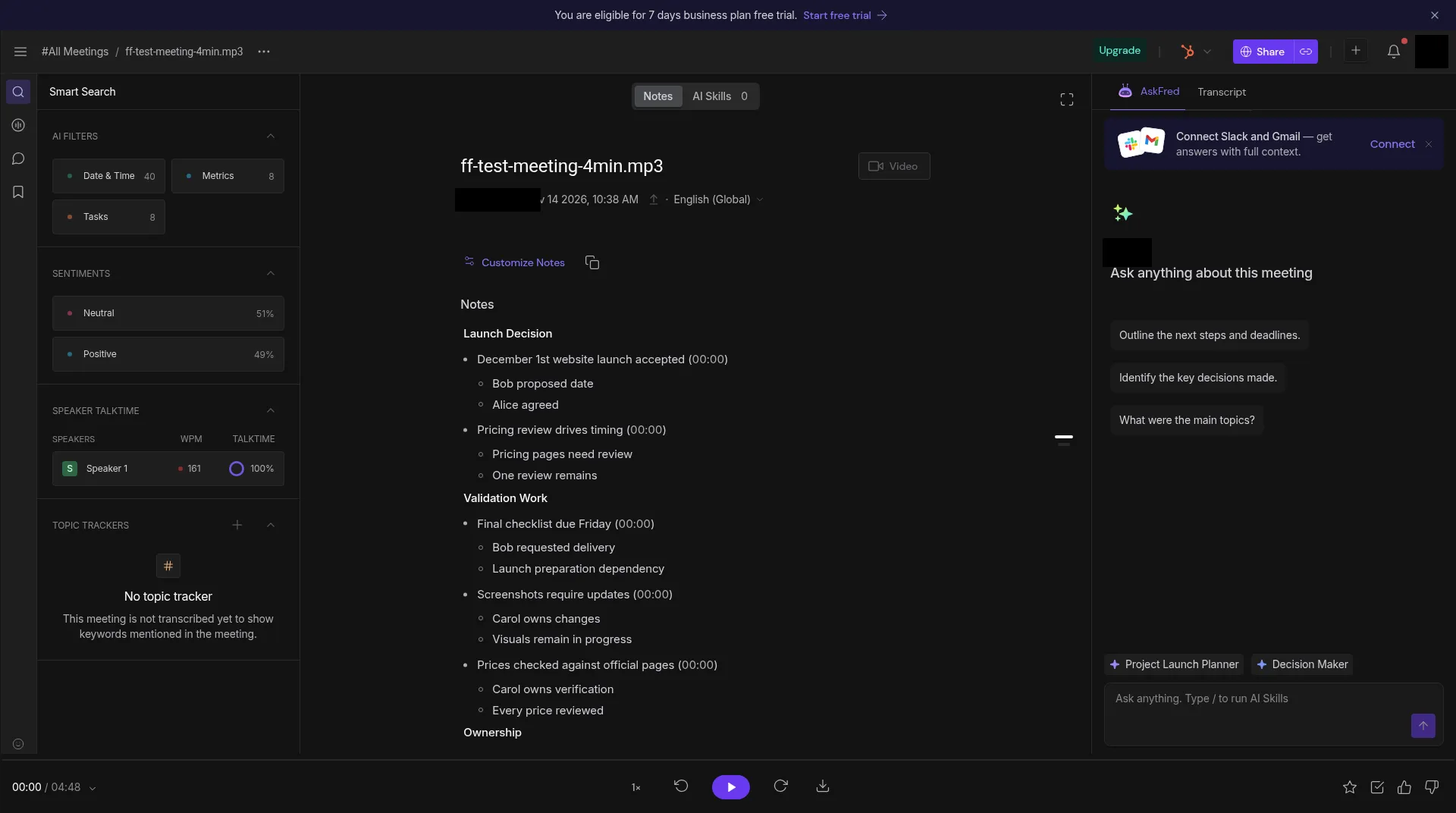
In a few places, our Free account showed something different from Fireflies’ pages. We list both and don’t choose one:
- Storage. The account menu showed “5 / 400 mins” with no per-team or per-seat label. The pricing page says per team; help articles say per seat.
- Upload limits. The upload screen said “Up to 100 MB for video and 500 MB for audio. Supports MP3, M4A, WAV, MP4, WEBM.” That matches the upload help article. The Free plan help article lists 100MB for all files and doesn’t list WEBM.
- Multi-language. The language menu showed “Multi-Language (Auto Detect) (Beta)” with no lock or upgrade label. Fireflies’ Multi-Language help article says it’s for Business and Enterprise plans only. We didn’t try selecting it.
- Playback speed. The speed menu ran from 0.75x to 3x. Fireflies’ pages list 1x to 3x.
- Summary headings. The Notes had the sections “Launch Decision,” “Validation Work” and “Ownership.” We didn’t see an “Overview” or “Action items” heading, which a Fireflies help article lists for Free.
- AI credits. We didn’t see an AI credit balance anywhere we looked.
Downloads matched the help center: choosing PDF opened an “Upgrade to download meeting” screen, and we didn’t download anything.
We didn’t test the bot joining a real meeting, the Chrome extension, the mobile app, Customize Notes, speaker labels with more than one voice, or what happens when credits run out.
Where Fireflies’ own pages disagree
We read Fireflies’ pricing page and its help center on 2026-11-14. On the items below, the pages say different things. We list both sides instead of guessing which one is right. Check your own account before you rely on any of them.
- Free transcription. The pricing page’s Free card says “Unlimited transcription*” with an asterisk it doesn’t explain. The pricing table on the same page says “Limited.” The help center says Free includes 3 meeting transcriptions by default (5 if you sign up through the Chrome extension, 10 for new mobile app users), and that turning on auto-join (letting Fireflies join your calendar meetings on its own) removes the cap on transcriptions. It says those limits apply to accounts created on or after September 1, 2026. One help FAQ adds another condition: you also share recaps with all invitees.
- Free storage. The pricing page says “400 mins of storage/team.” Two help articles say 400 minutes per seat. A third says 400 minutes per user, pooled across the team.
- Free AI credits. One help article says 20 AI credits per month. Other help articles and the billing page say 20 one-time credits on sign-up that don’t expire. The pricing card says “20 AI credits” with no period, and the pricing table leaves the Free cell blank.
- Free AI summaries. The pricing page says “Limited AI summaries.” One help article says Free gets summaries with an overview, detailed notes and action items that you can expand. Another opens with “unlimited AI summaries on the Free plan,” then says summaries use your AI credits. A third says AI summaries depend on your AI credit balance. The AI credits article says standard summaries don’t use credits at all.
- Integrations on Free. The Free plan help article says “All integrations are available on the Free plan,” including CRMs. The pricing table leaves Free blank for integrations, and the pricing FAQ says app and CRM integrations come with the paid tiers.
- Video recording. The pricing table and the video help article say video capture starts at Pro. A recording FAQ says it starts at Business. Neither lists video capture on Free.
- Upload limits on Free. The Free plan help article says files up to 100MB and 150 minutes. The upload help article says audio files up to 500 MB and video up to 100 MB, still 150 minutes.
- Languages. The plan cards say transcription in 100+ languages. The pricing FAQ says English is the primary language, with Spanish, French, Portuguese, Italian and 100+ others in beta.
Not listed on Fireflies’ public pages: how many seats Free allows, and a price for adding seats on Free.
Meeting length and limits
Free plans look similar until a long meeting hits a cap. Last checked: 2026-11.
Otter lists the tightest free cap: 30 minutes per conversation, with 300 minutes a month. Pro raises the cap to 90 minutes and Business to 4 hours. If your calls regularly run over an hour, that matters.
Fireflies lists a 2-hour recording limit per meeting on Free and Pro, 3 hours on Business and 4 hours on Enterprise. How many meetings Free transcribes, and whether its 400 minutes of storage is per team or per seat, depends on which Fireflies page you read (see above). Pro lists 8,000 minutes of storage per seat, and Business lists unlimited.
Fathom lists unlimited recordings and transcriptions on Free, and its comparison table lists recordings and call storage as unlimited. It doesn’t list a per-meeting length cap.
Whichever you choose, run one real meeting at your normal length on the free plan before paying.
Privacy and consent
A note taker records other people, so consent matters as much as price. Tell participants at the start of the call, and follow your company’s recording policy.
If you handle health data, look at the HIPAA options. Fathom’s plan cards list HIPAA compliance with a standard BAA from Team, and its comparison table shows “Standard BAA” on Team and Business and “Eligible for custom BAA” on Enterprise (Free and Premium show a check in that row with no BAA wording). Otter’s Enterprise card lists HIPAA compliance as an add-on. Fireflies limits HIPAA to Enterprise with Private Storage (an Enterprise storage setting) and a signed BAA, but its pages word it differently: the pricing, security and HIPAA pages say “HIPAA-ready,” while its Trust Center says “HIPAA compliant with BAA signed for Enterprise clients that enable Private Storage.”
Fireflies also lists SOC 2 Type II (an independent audit of a company’s security controls over time) on its pricing page, security page and Trust Center. A SOC 2 Type I report is Not listed on its public pages.
How to choose in 10 minutes
- Sign up for Fathom Free and record your next internal call.
- If you want AI action items, try Fathom Premium; if Fireflies’ free summaries feel limited, try Fireflies Pro. Use monthly billing for the first month.
- If you need live transcription during the call, test Otter Basic on a meeting under 30 minutes.
- Decide on yearly billing only after a month of real use.
For a step-by-step setup, including a consent script and copy-paste prompts, read our guide to taking meeting notes with AI.
Do more with your transcripts
A transcript is raw material. You can paste it into a chat assistant to draft a recap email or a project brief. Our ChatGPT vs Claude vs Gemini comparison helps you choose which assistant to use.
Turning meeting insights into blog posts? How to use AI to write a blog post walks through that workflow, and AI writing tools for bloggers helps if you’ll edit the drafts heavily.
1. Fathom
Our choicePrice: Free; Premium $20/user/mo, or $16/user/mo billed yearly; Team $19/user/mo, or $15/user/mo billed yearly; Business $34/user/mo, or $25/user/mo billed yearly; Enterprise $35/user/mo, billed yearly only · Last checked: 2026-11
Pros
- Free plan lists unlimited recordings and transcriptions.
- Bot-free capture in beta on Mac, or a meeting bot.
- Business adds CRM field sync (call details written into your sales database).
Cons
- AI action items need Premium.
- Team plan has a 2-user minimum.
- Ask Fathom, its chat feature, isn't checked on Free in the comparison table (it shows an hourglass icon).
- Best for
- Individuals and small teams who want unlimited free recordings and transcriptions.
- Skip it if
- Anyone who wants AI action items without paying.
2. Fireflies.ai
Price: Free; Pro $18/seat/mo, or $10/seat/mo billed yearly; Business $29/seat/mo, or $19/seat/mo billed yearly; Enterprise $39/seat/mo billed yearly (monthly price Not listed) · Last checked: 2026-11
Pros
- Pro is $10/seat/mo billed yearly.
- Chrome extension records Google Meet calls without a bot.
- Pro lists 8,000 minutes of storage per seat; Business lists unlimited.
Cons
- Free-plan limits on transcription, storage, AI credits and summaries differ between its pricing page and help center.
- Downloading transcripts and recordings needs Pro or higher.
- Multi-language Mode is Business and Enterprise only.
- Best for
- Teams that want a shared meeting library with per-seat pricing.
- Skip it if
- Anyone who needs clear free-plan limits; Fireflies' own pages describe them differently.
3. Otter.ai
Price: Basic free; Pro $16.99/user/mo, or $8.33/user/mo billed yearly; Business $30/user/mo, or $19.99/user/mo billed yearly; Enterprise custom pricing · Last checked: 2026-11
Pros
- Joins Zoom, Microsoft Teams and Google Meet on the free Basic plan.
- Live transcription and AI Chat on the free plan.
- Lowest yearly individual price of the three.
Cons
- Free plan: 300 minutes a month, 30 minutes per conversation.
- Pro caps meetings at 90 minutes.
- Transcription lists six languages.
- Best for
- People who want live transcription during meetings and a clear minute allowance.
- Skip it if
- Anyone with long meetings on the free plan, which caps each conversation at 30 minutes.