Short answer: ChatGPT Plus is our choice for mixed everyday work, Claude Pro for writing and coding, and Google AI Pro for Gmail and Docs users. In our test, ChatGPT Free and Gemini both answered our office brief with all four parts, but only ChatGPT calculated the attendance rate. The catch: our Claude choice and our Gmail and Docs choice follow official feature lists, not our own tests.
ChatGPT Plus and Claude Pro each cost $20 a month, and Google AI Pro costs $19.99 a month. Claude Pro ($200/yr) and Google AI Pro ($199.99/yr) cost less on yearly billing, so price won’t decide this for you. What decides it is the work you do and the apps you already pay for.
Who should use which
- Use ChatGPT if your AI work is a mix of jobs and you want one plan to cover it.
- Use Claude if your day is long documents, reports or code. Claude Code is included with Pro, and yearly billing drops it to $17 a month.
- Use Gemini if you live in Google Workspace. Google AI Pro bundles 5 TB of storage, so it can replace a Google One bill you already pay.
Still unsure? Start free on all three for a week, then pay for the one you opened most.
| Feature | ChatGPT PlusRecommended | Claude Pro | Google AI Pro |
|---|---|---|---|
| Monthly price | $20 | $20 | $19.99 |
| Yearly discount | $200/yr ($17/mo) | $199.99/yr | |
| Free plan | |||
| Image generation | |||
| Voice conversations | |||
| Deep research | |||
| Coding agent included | Codex | Claude Code | Antigravity (entry limits) |
| Projects / workspaces | Not listed | ||
| Scheduled tasks | |||
| Office app integration | Excel, Google Sheets | Microsoft 365 | Gmail, Docs, Sheets |
| Cloud storage included | 5 TB |
Pricing: what $20 actually buys
Each company has a free tier, a roughly $20 tier and a premium tier. The $20 tier is the one most office workers and freelancers should compare. If you only ask a few questions a week, try the free tiers first; they may be enough. Last checked: 2026-11.
| Plan | Price | Billing options |
|---|---|---|
| ChatGPT Plus | $20/mo | Monthly only |
| Claude Pro | $20/mo | Or $17/mo billed yearly ($200/yr) |
| Google AI Pro | $19.99/mo | Or $199.99/yr |
| Google AI Plus (400 GB) | $4.99/mo | Monthly |
| ChatGPT Go | Not listed (varies by region) | Monthly only |
ChatGPT Go is a lower-cost plan between Free and Plus. Its price varies by region on chatgpt.com/pricing, and OpenAI’s help page doesn’t list a US amount, so check the pricing page for your country.
The premium tiers are for heavy users. Claude Max is $100 a month and Claude Ultra is $200 a month. Google AI Ultra starts at $99.99 a month, with a $199.99-a-month tier for 20x the Pro limits.
ChatGPT Pro comes in three usage tiers at $100, $200 or $500 a month. Don’t upgrade to any premium tier until you hit the $20 plan’s limits for two weeks in a row.
ChatGPT: the all-rounder
ChatGPT’s strength is range. Plus covers image creation, voice chats, deep research, projects, scheduled tasks and custom GPTs in one place.
That makes it a sensible first choice when you don’t know yet what you’ll use AI for. A freelancer can write a proposal, mock up a cover image and set a weekly reminder task without leaving the app.
The downsides are practical. There’s no yearly discount on Plus, and the model menu changes often enough that it is easy to choose the wrong one.
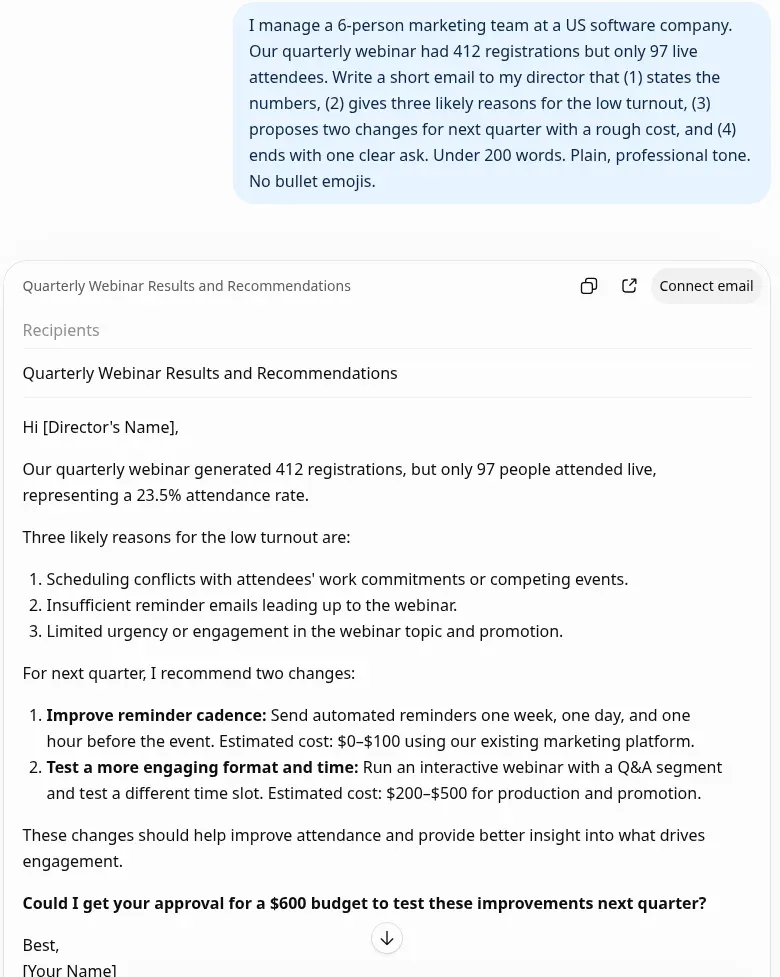
In our test, ChatGPT’s Free plan answered our standard office brief on the first attempt with all four requested parts, a correct 23.5% attendance rate and about 157 words, under the 200-word limit. The three reasons and cost estimates were plausible guesses rather than facts from our prompt, so you’d still need to check them before sending.
Claude: the writer’s and developer’s choice
Claude is built around long, focused work. Its context window goes up to 1M tokens depending on the model, so you can load a long report or several chapters at once.
Pro adds Projects to keep files and instructions together, plus Research and Claude Code. Claude Code alone can save a developer a second subscription; see our AI coding assistant comparison for how it stacks up.
The trade-off is usage limits that reset every 5 hours and every week. Heavy users hit them, which is what Max and Ultra are for: Max gives 5x Pro’s usage, and Ultra drops the 5-hour limit for verified accounts with 10x Pro’s weekly usage.
Not tested: our test session had no Claude sign-in, so we didn’t run our prompts in Claude. Everything in this section comes from Anthropic’s official pages.
Gemini: the Google Workspace choice
Gemini makes the most sense as part of Google AI Pro. For $19.99 a month you get Gemini in Gmail, Docs and Sheets, plus 5 TB of storage and video credits in Google Flow.
If you already pay Google for storage, the AI is close to a free add-on. The plan page also lists uploads of up to 1,500 pages, which helps with big research packs.
Outside Google’s apps the value drops.
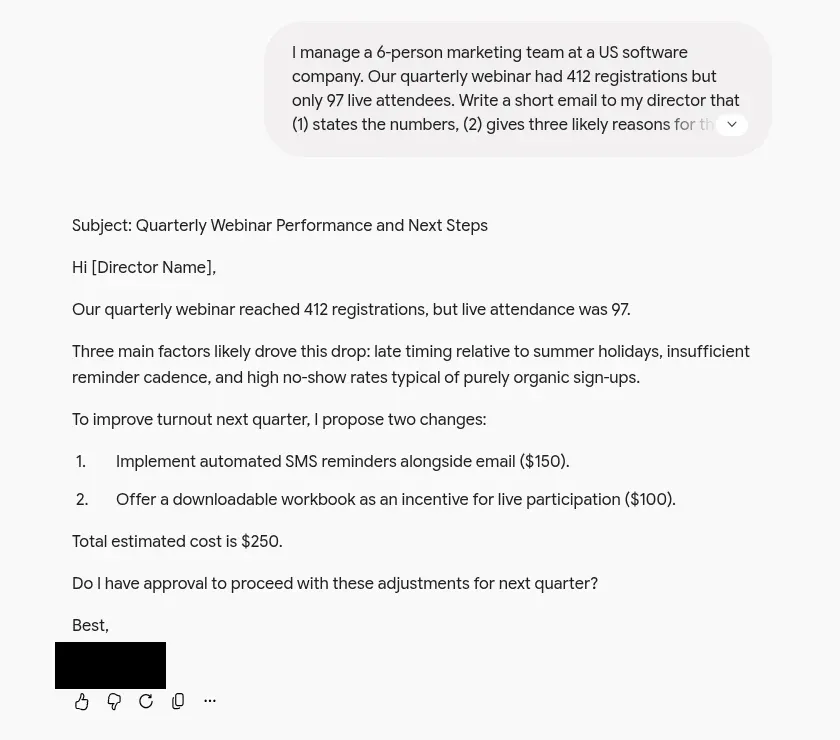
In our test, Gemini (signed in, plan not shown, mode “Gemini Auto”) answered our standard office brief with all four requested parts. It stated both numbers, 412 registrations and 97 live attendees, but gave no attendance rate. It proposed two changes with costs ($150 and $100, “Total estimated cost is $250”) and ended with a clear ask.
One of its three reasons, “summer holidays”, wasn’t in our prompt, so check it before sending. Gemini also signed the email with a personal name, which we blacked out. We didn’t test Gemini in Gmail or Docs.
Head-to-head by task
| Task | Our choice | Why |
|---|---|---|
| Blog posts and long reports | Claude | Long context and Projects |
| Social images and thumbnails | ChatGPT | Image creation built into Plus |
| Email triage in Gmail | Gemini | Works inside Gmail |
| Coding help | Claude | Claude Code included with Pro |
| Research briefs | Tie | All three list deep research |
| One tool for many jobs | ChatGPT | Images, voice and research on one plan |
For writing in depth, our best AI writing tools for bloggers guide compares these assistants against dedicated tools like Jasper and Grammarly.
How to choose in 10 minutes
- Write down the three tasks you’d use AI for most this month.
- Match each to the table above.
- If two or more point to one tool, buy that one.
- If you split, choose the one that matches the apps you already pay for.
Want to see the workflow in action? Our step-by-step guide to writing a blog post with AI uses the same assistants. You can read how we compare tools on our How We Test page.
The tools in detail
1. ChatGPT
Our choicePrice: Free; Go: Not listed (varies by region); Plus $20/mo; Pro $100, $200 or $500/mo (all monthly only) · Last checked: 2026-11
Pros
- Image creation, voice, deep research, projects, scheduled tasks and custom GPTs on one plan (Plus).
- Codex coding agent usage is included on Plus.
- Huge library of custom GPTs built by other users.
Cons
- Plus is billed monthly only — no yearly plan, per OpenAI's help center.
- Model names and limits change often, so the model menu can be confusing.
- Pro starts at $100 a month, five times the Plus price.
- Best for
- People who want one tool for many kinds of everyday work.
- Skip it if
- Anyone who wants a yearly discount, or who already pays for Google storage they would lose.
2. Claude
Price: Free; Pro $20/mo or $17/mo billed yearly ($200/yr); Max $100/mo; Ultra $200/mo · Last checked: 2026-11
Pros
- Pro includes Claude Code, Projects, Research and Claude in Chrome and Microsoft 365.
- Yearly billing cuts Pro to $17/mo.
- Context window up to 1M tokens depending on the model.
Cons
- Usage resets on 5-hour and weekly windows, which heavy users notice.
- No native image generation: Claude builds charts and diagrams, not photos or illustrations.
- Free plan caps Projects at 5.
- Best for
- Writers, analysts and developers who work with long documents and want Claude Code included.
- Skip it if
- People who want built-in image generation or a large ecosystem of third-party bots.
3. Gemini
Price: Free; Google AI Plus (400 GB) $4.99/mo; Google AI Pro $19.99/mo, or $199.99/yr; Ultra from $99.99/mo · Last checked: 2026-11
Pros
- Google AI Pro bundles 5 TB of storage plus Gemini in Gmail, Docs and Sheets.
- Uploads of up to 1,500 pages of files, per Google's plan page.
- Includes Google Flow credits for video and image generation.
Cons
- Best features assume you live in Google's apps.
- Plan names and model names change often.
- In our test, Gemini added a reason ("summer holidays") that wasn't in our prompt.
- Best for
- Gmail, Docs and Drive users who also want 5 TB of storage in the same bill.
- Skip it if
- Microsoft 365 shops, or anyone who doesn't need the bundled storage.
Final verdict
If you want a single subscription for mixed work, get ChatGPT Plus. Writers and developers should look at Claude Pro, our feature-list choice from the short answer. If your day runs on Gmail and Docs, Google AI Pro fits best. That choice follows Google’s official feature list; we didn’t test Gmail or Docs.
Whichever you choose, recheck the price on the official page before you pay. Plans in this category change every few months.