Short answer: The best AI coding assistant depends on the job. In our test, Cursor Free edited a file on a sample site, and Copilot’s web chat suggested a one-line fix for a bug in a small script. The limit: we tested only free plans on small tasks, so choose by editor, terminal (the command-line window) or AI-first editor.
Want help inside the editor you already use? GitHub Copilot Pro lists support for VS Code, Visual Studio, JetBrains IDEs and more, at $10 a month. That Pro claim is from GitHub’s official feature list. We used only Copilot Free’s web chat, not the editor. It found a cents bug and suggested one fix line. We applied that line and got 1 pass, 0 fail.
Want an agent (a helper that can edit many files) in the terminal? Claude Code comes with Claude Pro at $20/mo, or $17/mo billed yearly. That is from Anthropic’s official pricing page. We have not tested Claude Code.
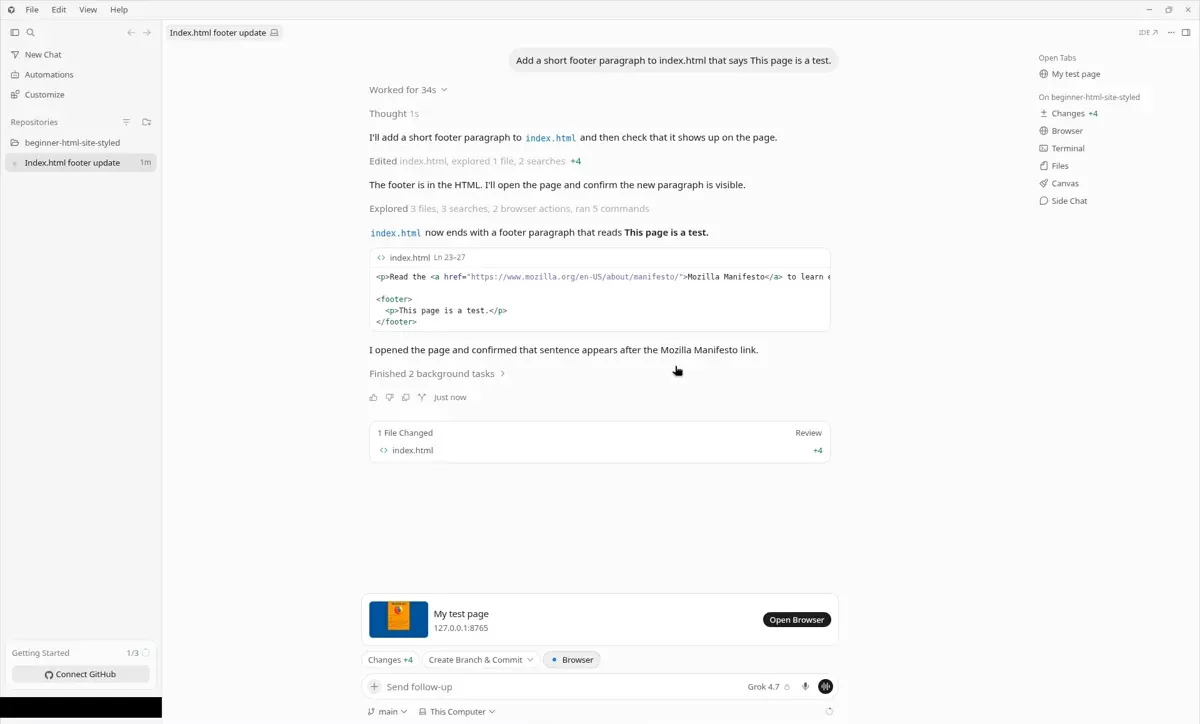
Want an editor built around AI? Cursor lists an agent on every plan, including Free. That is from Cursor’s official feature list. In our test, the Free plan’s Agent added a footer paragraph to index.html. The app showed “Worked for 34s” and changed one file (+4 lines). We tested only Cursor Free, on one small public sample project.
The category has shifted from autocomplete to agents that edit many files at once. The question is no longer “does it suggest code?” but “where does it run, and how much agent use do I get?”
Who should use which
- GitHub Copilot — you want an assistant in the editor you already use, going by GitHub’s official feature list. In our test, we used only the Free web chat.
- Claude Code — you want a terminal agent, going by Anthropic’s official feature list.
- Cursor — you want an editor built around AI. We tested only Cursor Free.
- OpenAI Codex — you already pay for ChatGPT Plus and don’t want another bill, going by OpenAI’s official list.
- Google Antigravity — you want to start an AI coding platform at no cost, going by Google’s official list.
| Feature | Copilot Pro | Claude Code | Cursor | OpenAI Codex | Antigravity |
|---|---|---|---|---|---|
| Entry paid price | $10/mo | $20/mo ($17/mo yearly) | $8/mo ($80/yr) | $20/mo | $19.99/mo (AI Pro) |
| Free option | Limited | ||||
| Works in your existing IDE | |||||
| Inline autocomplete | Not listed | ||||
| Agent edits across files | |||||
| AI pull request review | Premium+ | Not listed | |||
| Terminal / CLI | |||||
| Bundled with a chat assistant | Claude | Grok | ChatGPT | Gemini |
Pricing compared
Last checked: 2026-11 on each official page.
| Tool | Free | Main paid plan | Heavy-use plan |
|---|---|---|---|
| GitHub Copilot | Yes | Pro $10/mo | Pro+ $39/mo, Max $100/mo |
| Claude Code | No | Claude Pro $20/mo ($17/mo yearly) | Max $100/mo, Ultra $200/mo |
| Cursor | Yes | Plus $8/mo ($80/yr); Premium $30/mo ($300/yr) | Super $100/mo, Ultra $200/mo |
| OpenAI Codex | Limited (Free, Go) | ChatGPT Plus $20/mo | ChatGPT Pro $100/mo, $200/mo or $500/mo |
| Antigravity | Yes | Google AI Pro $19.99/mo | AI Ultra from $99.99/mo |
Copilot meters agent work in GitHub AI Credits. Pro includes $15 a month of credits ($10 base plus a $5 flex allotment), and Pro+ includes $70.
Cursor’s cheapest plan, Plus, costs $8/mo, or $80/yr (Last checked: 2026-11). It runs only Cursor’s own models: Grok 4.7, Grok 4.6, Grok 4.5 and Composer 2.5. Third-party models need Premium or higher and are billed at API list price from prepaid credit, so budget for that.
GitHub Copilot: in the editor you already use
GitHub lists support for VS Code, Visual Studio, JetBrains IDEs (code editors), Xcode, Neovim, Eclipse, Zed and others, plus the CLI and github.com.
Pro costs $10 a month (Last checked: 2026-11). In our pricing table, only Cursor Plus, at $8 a month, costs less. Copilot is the cheapest paid plan here that also lists support inside your current IDE (the app you write code in). That comparison is from official price and feature lists.
GitHub says Pro adds agent mode (the IDE setting that lets Copilot edit files) and pull request reviews. Pro can also assign an issue to Copilot so it opens a pull request. If your team already uses GitHub, those features are listed on the Pro plan at $10 a month.
Upgrade to Pro+ ($39 a month) if you need premium models such as Opus.
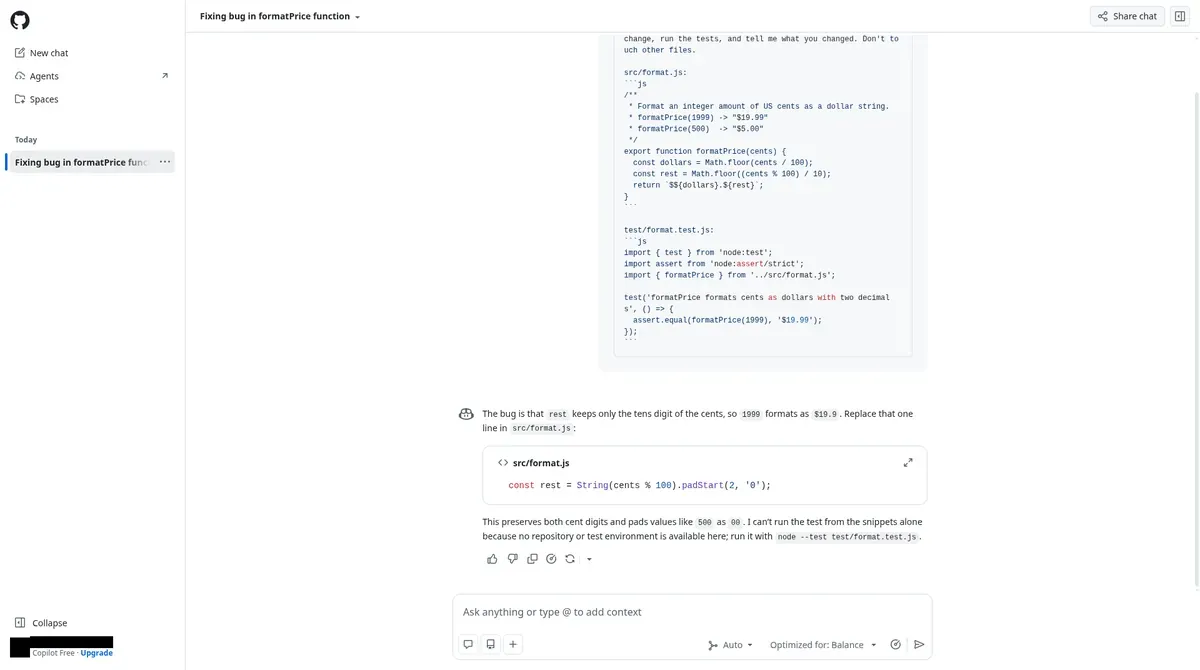
In our test (web chat, Copilot Free, 2026-11-14): we used the web chat at github.com/copilot, not in VS Code. This was web chat, not Agent mode. Agent mode is Not tested. We did not connect a repository (a project folder on GitHub).
The model menu was set to Auto, and the other models were greyed out. The menu said “Upgrade to access more models and higher limits.” Which model Auto actually chose is Not shown.
Copilot found a cents bug in formatPrice and suggested one replacement line:
const rest = String(cents % 100).padStart(2, '0');Copilot wrote that it could not run the tests from the snippets alone. We applied that line and ran the tests ourselves. The result was 1 pass and 0 fail. The baseline before the fix was 1 fail, with ‘$19.9’ !== ‘$19.99’.
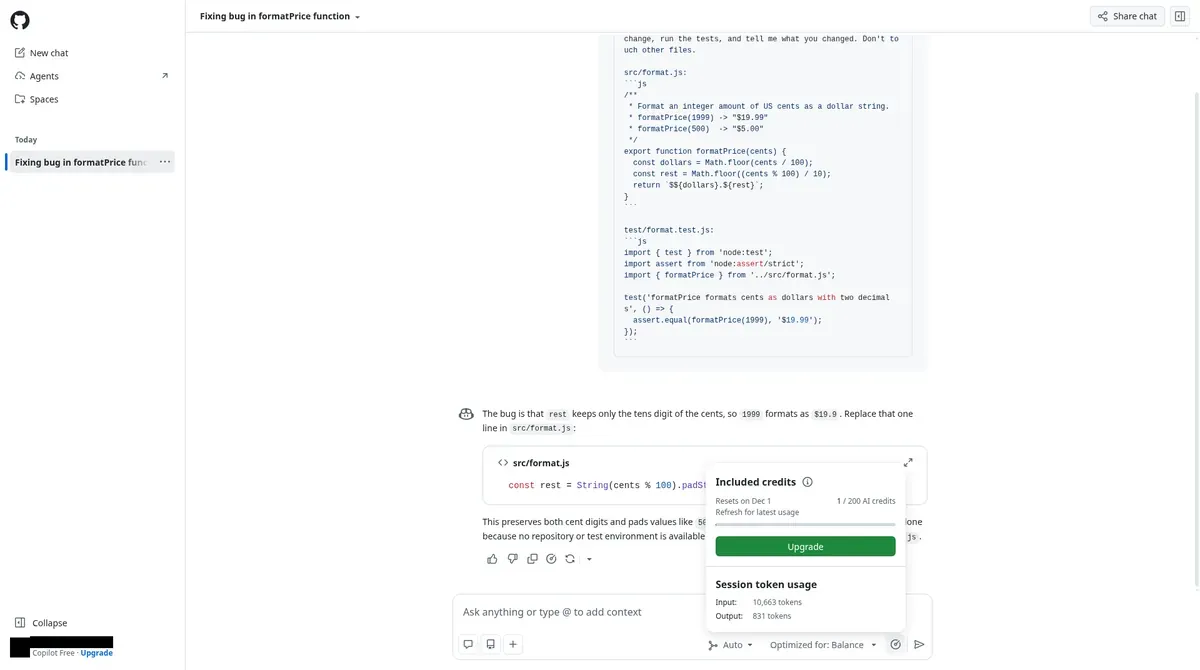
The usage pop-up showed “1 / 200 AI credits” (GitHub’s usage units) and “Resets on Dec 1.”
Claude Code: in the terminal
Claude Code comes with Claude Pro. You get Anthropic’s chat assistant and a coding agent for $20/mo, or $17/mo billed yearly.
It suits developers who prefer to describe a change and review the diff. Long context helps when the agent needs to read a lot of the codebase first.
Heavy users will feel the 5-hour and weekly limits. Max ($100 a month) gives 5x Pro’s usage. Ultra ($200 a month) has no 5-hour limit for verified accounts and gives 10x Pro’s weekly usage. Our ChatGPT vs Claude vs Gemini comparison covers the rest of the Claude plan.
Cursor: an AI-first editor
Cursor is a full editor designed around AI agents. Every plan includes the agent; Premium ($30 a month) adds cloud agents, automations, AI code reviews via Bugbot and code hosting.
Cursor is now sold as part of The X Subscription, bundled with Grok and X features. Plus covers only Cursor’s own models, Grok 4.x and Composer 2.5. If your team standardizes on other models, you need Premium or higher and pay API list price on top.
In our test on Cursor’s Free plan (2026-11-14), we asked the Agent to add a footer line to index.html in MDN’s public sample website. It showed “Worked for 34s”, changed one file (+4 lines) and opened the page to check the result. A two-sentence question in Ask mode showed “Worked for 4s”.
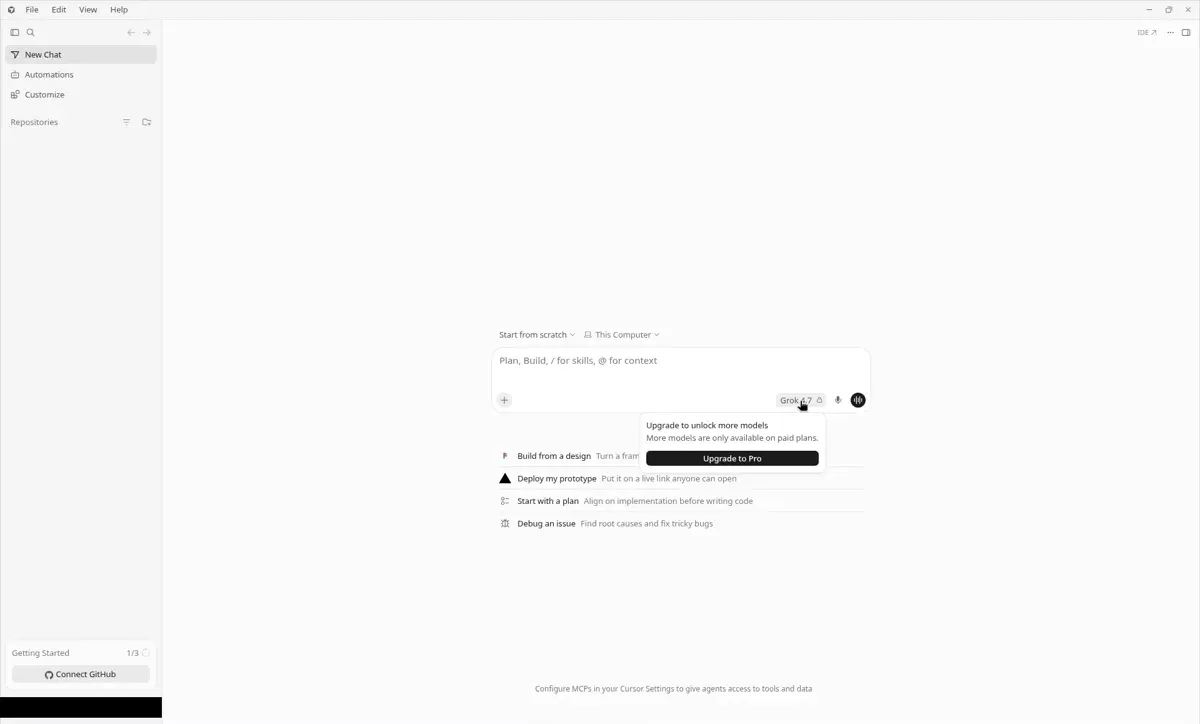
After those two tasks, the dashboard read “12% used” of the Free plan’s included usage, with “Resets Dec 14, 2026”. Free offered only one model, Grok 4.7. A pop-up said “More models are only available on paid plans.” On first sign-in, Data Sharing was on by default, and we switched it off.
Tested on the Free plan. We didn’t test cloud agents, Bugbot or any paid plan.
OpenAI Codex: if you pay for ChatGPT
ChatGPT Plus lists expanded Codex usage, so if you already pay $20 a month you have a coding agent included. Pro raises limits with longer Codex sessions.
OpenAI publishes Codex limits for Plus only as estimated ranges, such as 15–160 local messages per 5 hours on GPT-6.1 Sol. Treat it as a strong add-on rather than a team-wide tool until you’ve tested your workload.
Google Antigravity: free to start
Google’s Antigravity is an agentic development platform that’s free to start, with basic weekly rate limits. Google AI Pro and Ultra subscribers get higher limits.
Limits are described rather than quantified, so it’s not yet the safest choice for teams.
How to choose in five minutes
- Need it inside JetBrains or Xcode? Choose Copilot (official feature list).
- Prefer the terminal and big refactors? Choose Claude Code (official feature list).
- Willing to switch editors? Start with Cursor’s free plan (we tested Free only).
- Already on ChatGPT Plus? Look at Codex before buying another tool (official feature list).
- Zero budget? Start with Copilot Free (we tested web chat only) or Antigravity (official feature lists).
Writing docs and READMEs too? Our best AI writing tools guide covers prose. Our testing approach is on the How We Test page.
The tools in detail
1. GitHub Copilot
Price: Free; Pro $10/mo; Pro+ $39/mo; Max $100/mo · Last checked: 2026-11
Pros
- GitHub lists support for VS Code, Visual Studio, JetBrains IDEs, Xcode and other editors.
- Pro includes agent mode, pull request reviews and assigning issues to Copilot.
- Free plan with limited chat and agent use, no card required.
Cons
- Premium models such as Opus need Pro+ ($39/mo).
- Usage is metered in GitHub AI Credits, which takes some learning.
- Code review is not on the Free plan.
- Best for
- Developers who want an assistant in the editor they already use.
- Skip it if
- Developers who want an editor redesigned around AI.
2. Claude Code
Price: Included with Claude Pro ($20/mo, or $17/mo billed yearly); Max $100/mo; Ultra $200/mo · Last checked: 2026-11
Pros
- Comes with Claude Pro, so one bill covers chat and coding.
- Long context helps with large codebases.
- Max and Ultra raise limits for heavy agent use.
Cons
- Not on Claude's Free plan.
- 5-hour and weekly usage windows apply on Pro and Max.
- Best for
- Developers comfortable in the terminal who want an agent to plan and edit across a repo.
- Skip it if
- Beginners who want inline autocomplete above all.
3. Cursor
Price: Free; Plus $8/mo, or $80/yr; Premium $30/mo, or $300/yr; Super $100/mo, or $1,000/yr; Ultra $200/mo, or $2,000/yr · Last checked: 2026-11
Pros
- Premium adds cloud agents, automations and AI code reviews (Bugbot).
- Agent available on every plan, including Free.
- Team plans with SSO and usage analytics.
Cons
- Plus runs only Cursor's own models (Grok 4.7, 4.6, 4.5 and Composer 2.5); third-party models need Premium or higher, billed at API list price.
- Sold as part of The X Subscription, bundled with Grok and X features, which complicates comparison.
- Switching editors costs time if your team is on JetBrains.
- In our test, Data Sharing was switched on by default at first sign-in; we had to turn it off.
- Best for
- Developers who want an AI-first editor with cloud agents and code review.
- Skip it if
- Anyone who wants third-party models included in the flat price.
4. OpenAI Codex
Price: Included with ChatGPT Plus ($20/mo) · Last checked: 2026-11
Pros
- Plus lists expanded Codex usage.
- Same account as your everyday ChatGPT use.
- Pro raises limits with longer Codex sessions.
Cons
- Plus limits are published only as ranges, e.g. 15–160 local messages per 5 hours on GPT-6.1 Sol.
- No yearly billing on Plus.
- Best for
- ChatGPT Plus subscribers who want a coding agent without another bill.
- Skip it if
- Anyone on ChatGPT Free or Go who needs more than lightweight coding tasks.
5. Google Antigravity
Price: No cost to start; higher limits with Google AI Pro ($19.99/mo) · Last checked: 2026-11
Pros
- Free to start with access to a variety of agent models.
- Google AI Pro and Ultra raise rate limits.
- Ties into Google AI Studio and the Gemini API.
Cons
- Rate limits are described, not quantified.
- Higher agent limits require a Google AI Pro or Ultra subscription.
- Best for
- Developers who want to try an agentic coding platform for free.
- Skip it if
- Teams that need predictable limits — free use has basic weekly rate limits.
Final verdict
The best AI coding assistant depends on the job. We do not have one overall choice.
Use GitHub Copilot Pro if you want an assistant in the editor you already use, going by GitHub’s official feature list. Use Claude Code if you want a terminal agent and already pay for Claude Pro, going by Anthropic’s list.
In our test, Cursor Free’s Agent edited one HTML file on a small public sample project. Use Cursor if you want an AI-first editor. We did not test Cursor’s paid plans. We did not test Copilot in VS Code, Claude Code, Codex or Antigravity. In our test, Copilot Free was web chat only. Agent mode is Not tested.
What we didn’t test
We did not test GitHub Copilot in VS Code. Agent mode is Not tested. We did not test Copilot Pro, Pro+ or Max. We did not test Claude Code, OpenAI Codex or Google Antigravity. We did not test Cursor Plus, Premium, Super, Ultra, Teams or Enterprise. We did not test Cursor cloud agents, Bugbot or paid-plan models.